


This article is sourced from online. Original author: Milon Moni
What is Email?
Email is the abbreviated form of electronic mail, which is a system that allows people to communicate with each other using digital technology. Although it is primarily a text-based communication system, technological advancements have made it possible to send files of various formats, images, or even streaming videos as attachments.
In other words, this is a fast and secure communication method by which one netizen user can very quickly send any type of information to another netizen user.
Why is email so popular?
A study has shown that people can present something much better in an email than they can using direct or interactive voice systems.
Moreover, compared to other communication systems, it is very inexpensive yet remains a high-quality communication solution. The recipient’s temporary absence or being busy does not negatively affect this email communication system.
A brief history of email
Around 1970, Ray Tomlinson invented a local email system using the TENEX operating system, which was named SNDMSG and READMAIL. Around 1971, he developed an email system suitable for ARPANET. He was the first to use the “@” symbol to identify email recipients, which is still used in current email systems.
After that, various mailing systems and standards such as MAIL, MLFL, RD, NRD, WRD, MSG, MMDF, and Send Mail were developed over time.
What is an email server?
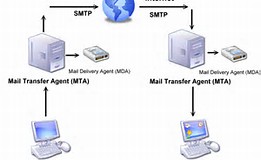
An email server is an application responsible for receiving emails from the sender, storing them, and forwarding those emails to the recipient. An email server is also called an MTA or Mail Transfer Agent.
All email clients’ addresses and emails are stored in the email server. When someone sends an email to a specific email address, that email is stored in a designated email server. The email server then delivers the email to the appropriate client.
What is an email client?
An email client is an application that enables sending, receiving, and organizing emails on a personal computer or workstation. It’s called a client because it is designed based on the client-server architecture.
Some very popular standalone email clients are Microsoft Outlook, Eudora, and Pegasus. Additionally, those who use free mail services like Yahoo, Gmail, or Hotmail have email clients integrated into those companies’ web pages.
What is SMTP?
Simple Mail Transfer Protocol, or SMTP, is a standard for transferring emails. SMTP was first defined in RFC 821. The latest version of SMTP is ESMTP or Extended SMTP, defined in RFC 5321.
SMTP handles all outgoing messages. This protocol uses port 25.
What is POP3?
Post Office Protocol version 3, abbreviated as POP3, is an application layer Internet standard protocol responsible for receiving emails. POP3 uses port 110 for this purpose, and an alternative port for POP3 is 995.
What are the parts of an email?
An email mainly has two parts:
1. Email Header: The email header contains the sender’s address, the recipient’s address, and additional necessary information.
2. Email Body: The email body contains your written email text and your signature.
How a real email system works
1. First, an email is sent from the sender’s email client or workstation using the SMTP protocol. It is mandatory for this email to have the recipient’s address.
2. The email travels through various routers over the public Internet area and is stored in an email server designated for the sender’s mails.
3. If the recipient’s email address is under the same MTA, the email server sends the mail directly to the recipient; if it is under a different MTA, the server forwards the email to another email server.
4. The email server uses the SMTP protocol to send the mail to the recipient’s address. Essentially, the recipient’s address and storage space for the mail are both in that email server. The email client communicates with the SMTP protocol’s port 110 via the POP3 protocol’s port 25 to receive the email.
5. The email then appears in the recipient’s email client inbox with an unread status.
6. When the recipient opens the email client and reads the mail, its status changes to read. If the sender has included any attachment, the recipient can download and save it to a local computer.
Sourced from: http://www.somewhereinblog.net/blog/milon_sub/29613592












This comment has been sanitized for the English site.